For independent repair shops

Quit writing estimates at 9 at night.

BayLine answers your customers, writes the estimate off your price book, books the bay and texts the updates. You look it over, hit send, and get back to turning wrenches.

Runs on the phone or tablet you already have. If you can text, you can run it.
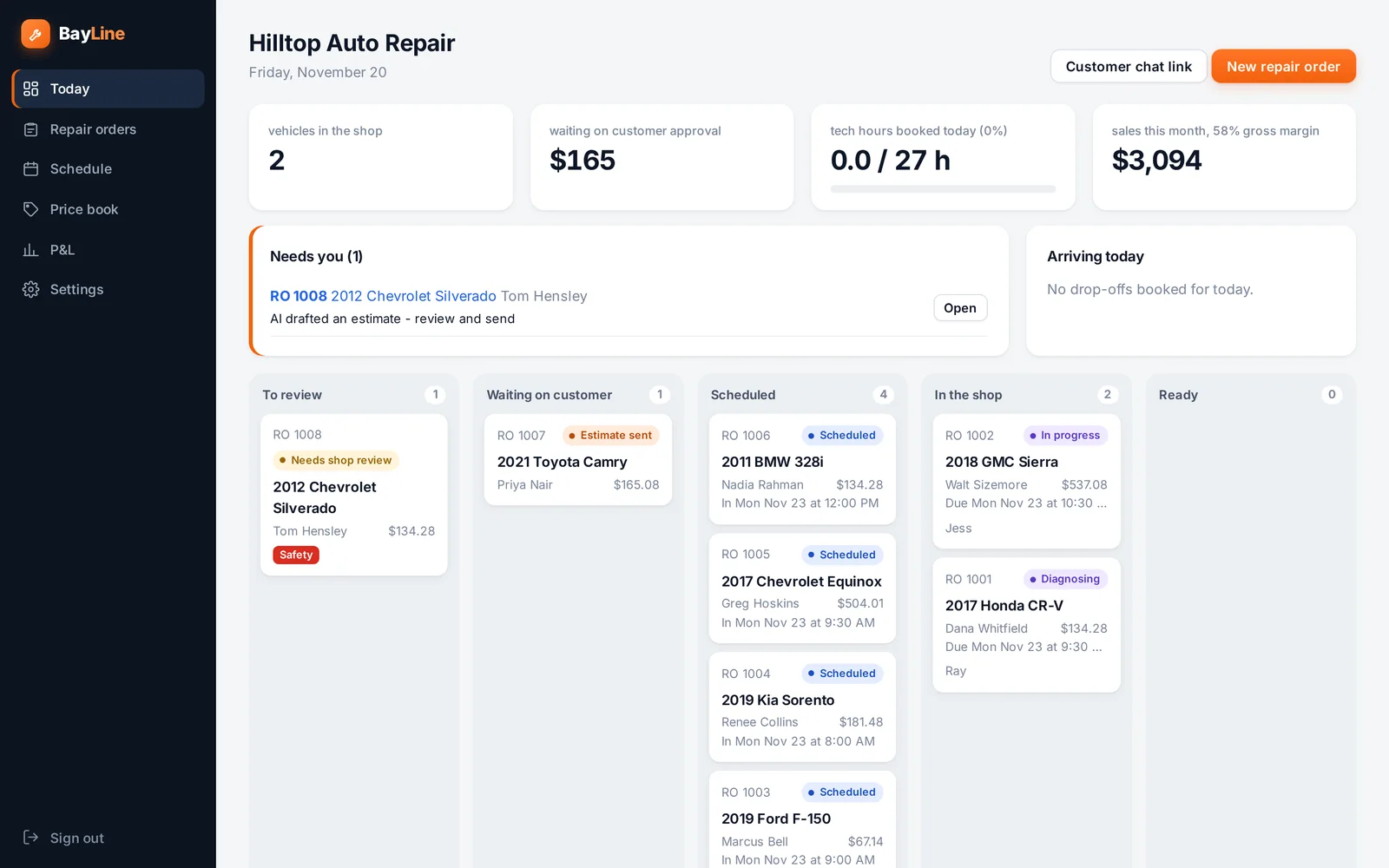
The BayLine shop board: jobs to review, waiting on customers, scheduled, in the shop and ready
A customer describing a brake problem to the shop's chat on their phone
Sound familiar?

The work isn't the problem.
Everything around it is.

The phone rings while you're under a truck

You wipe your hands, take the call, lose your place. Or you let it ring and that job goes down the road.

"Is it done yet?"

Same customer, fourth call today. Every one of them pulls somebody off a car to go look.

You find more once it's on the lift

Now the car is tying up a bay while you leave voicemails trying to get a yes on the extra work.

How it works

From "it's making a noise"
to keys in hand.

01

The customer tells it what's wrong

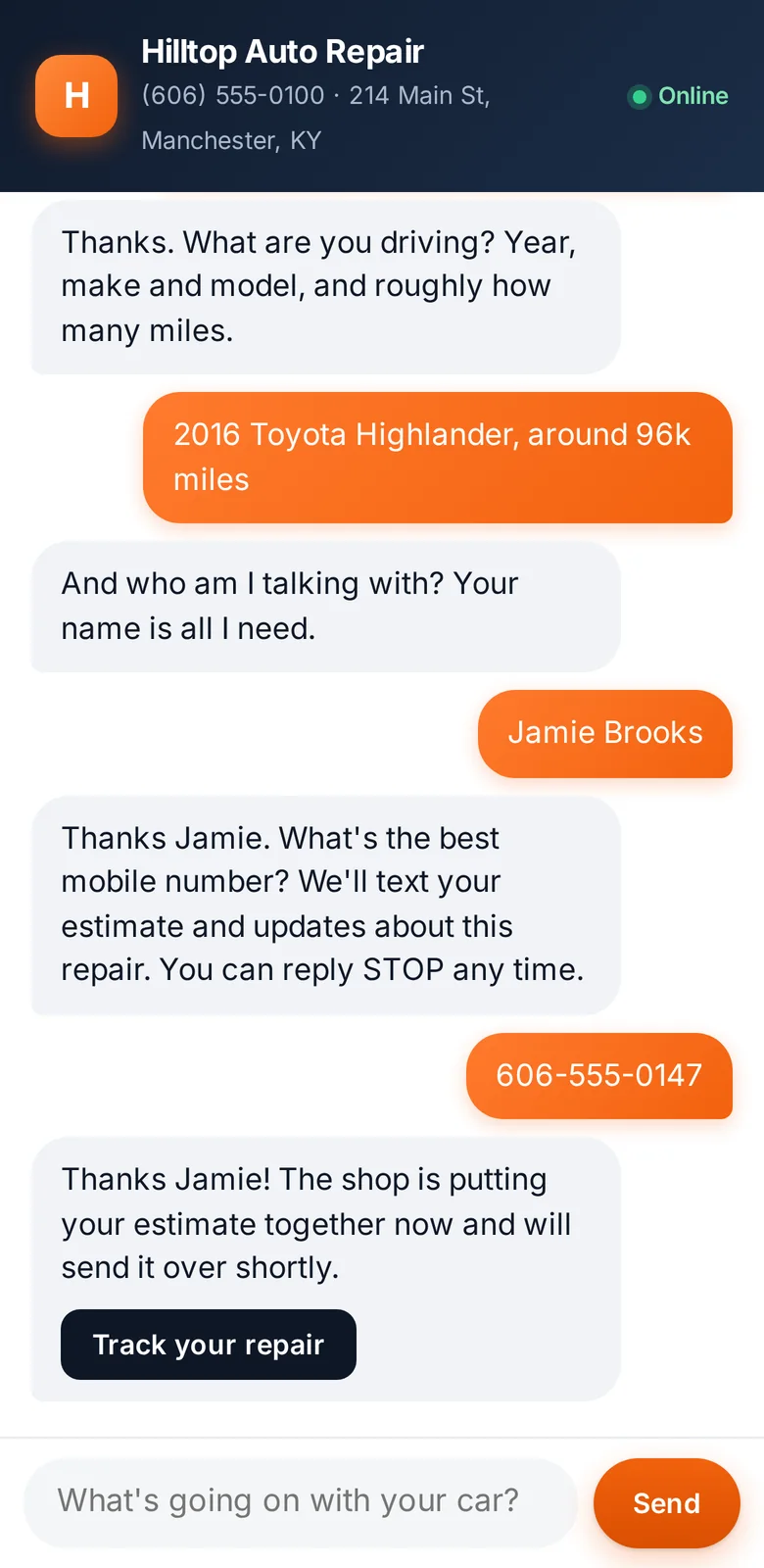
They text your shop's link or tap it on your website, day or night. BayLine asks what a good service writer asks: when does it happen, any lights on, is it safe to drive. Then it gets the year, make, model and a phone number.

  • No app for the customer to download
  • Tells them not to drive it when it sounds unsafe
  • Never quotes a price on its own
Customer chat collecting the vehicle and contact details
02

The estimate is written before you put the wrench down

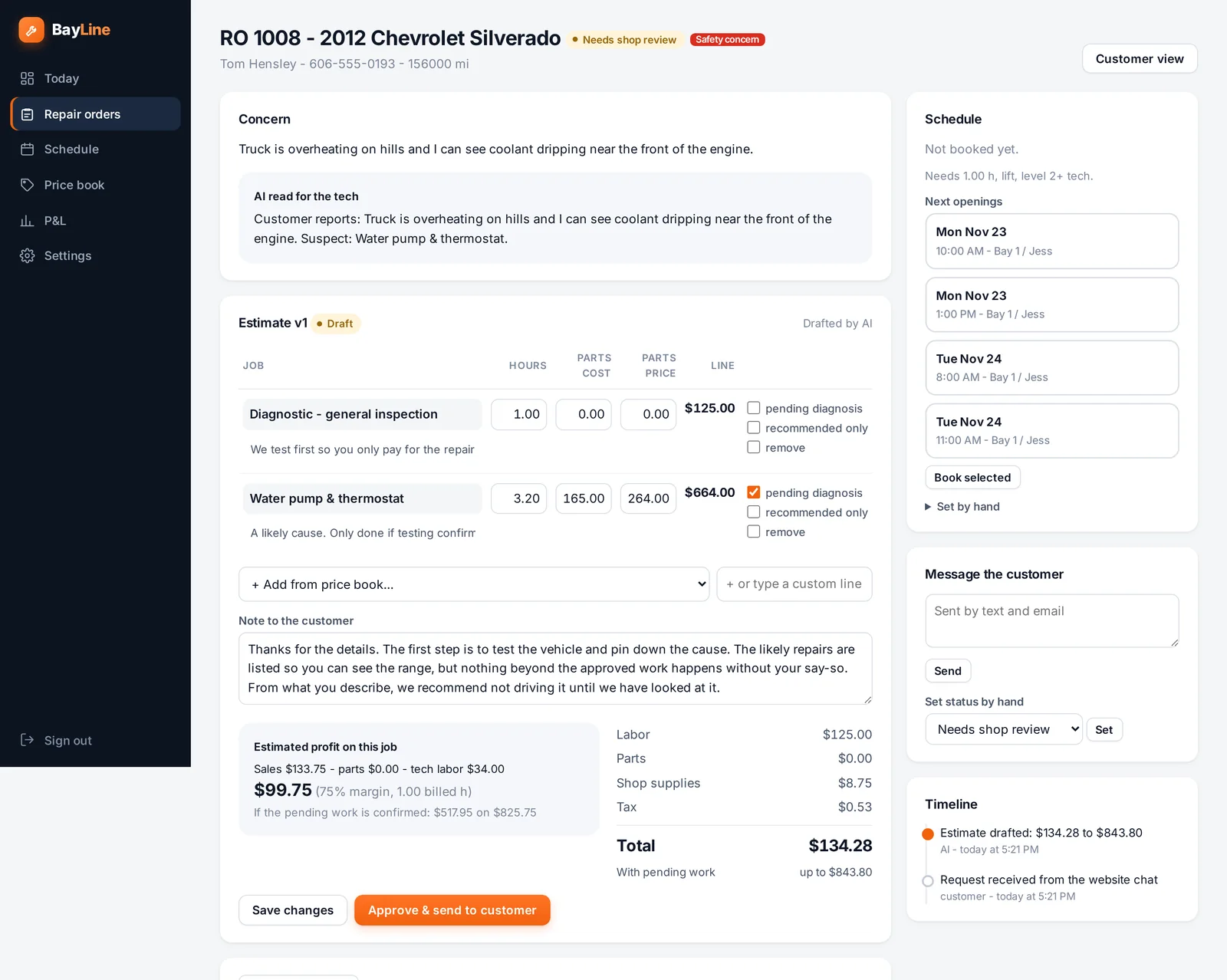
Built from your price book: your labor rate, your hours, your parts markup, shop supplies and tax. If the cause isn't certain it quotes the diagnostic first and lists the likely repair as "possible," so nobody gets promised a number you can't keep.

  • Change any line, hours or price in seconds
  • See your profit on the job before you send it
  • Nothing reaches the customer until you approve it
An estimate drafted for review with hours, parts cost, price and estimated profit
03

They approve it and pick a drop-off time

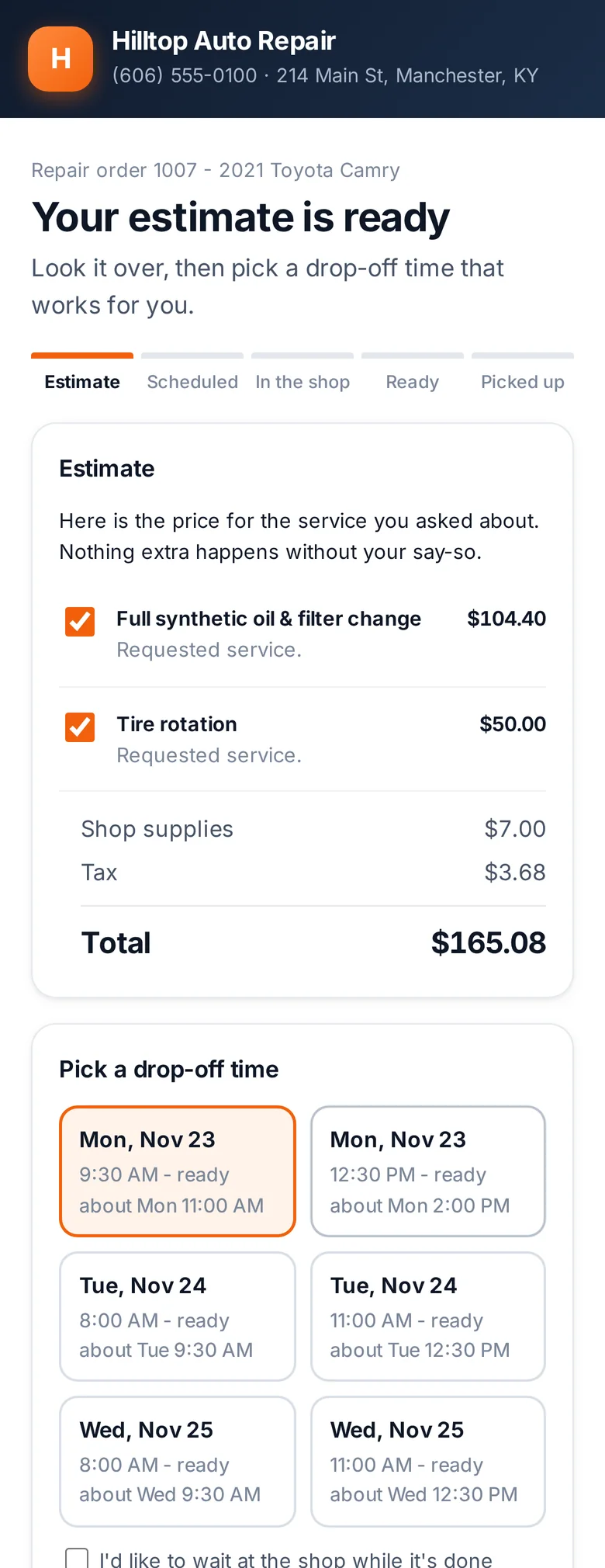
The customer gets a text with the estimate, signs off with their name, and picks from times that are actually open. BayLine knows your hours, your bays and who can do the job.

  • Alignments go on the alignment rack. Lift jobs never land on a flat bay.
  • Your A tech stays free for diagnostics instead of doing oil changes
  • Special-order parts? It won't book the car before they can be there
Customer approving an estimate and choosing a drop-off time on their phone
04

Find more on the lift? The quote updates itself

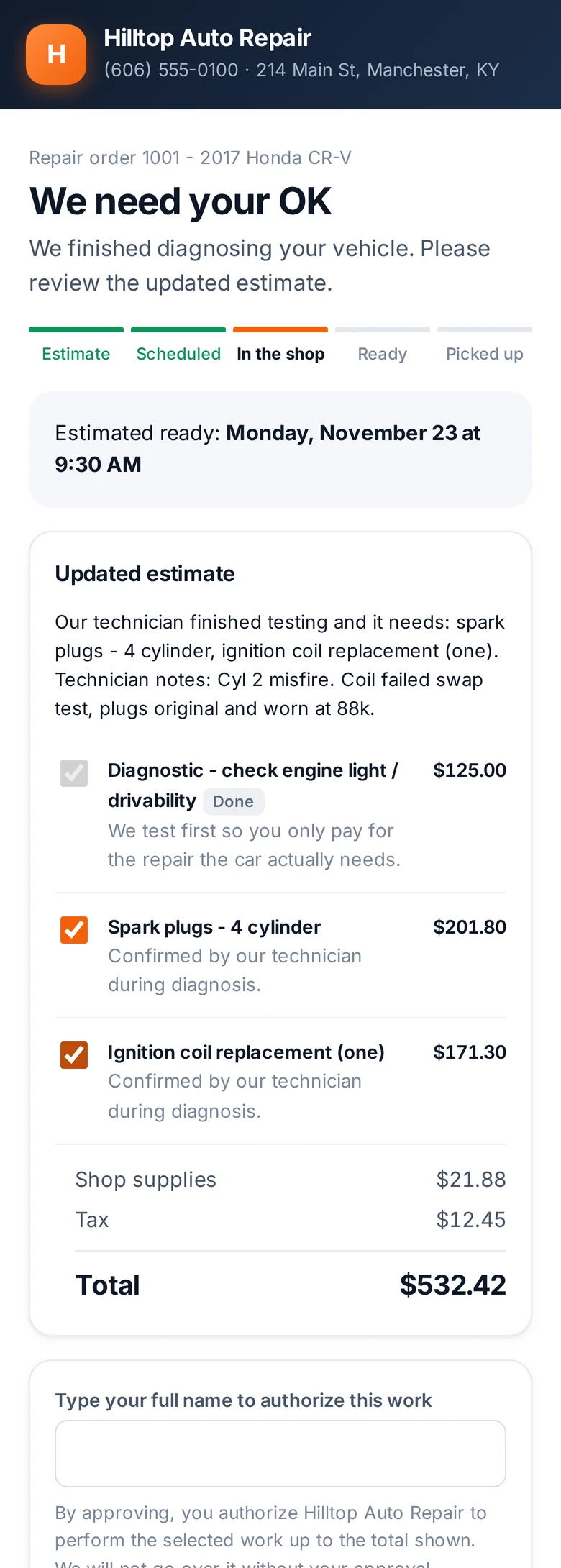
Your tech types what they found: codes, a couple of notes. BayLine rewrites the estimate, you check it, and the customer gets a text asking for a yes. They can approve the coil and plugs and pass on the flush, right from their phone.

  • Written approval with a name and a time stamp, every time
  • Declined work is saved so you can follow up later
  • The finish time moves with the job
Customer reviewing an updated estimate after diagnosis
05

They hear from you before they think to call

Checked in. Parts on order. Work started. Ready for pickup, with the total. Texts and emails go out on their own as the job moves, and customers can ask "when will it be ready?" any time and get a straight answer.

  • Anything it can't answer gets flagged for you
  • Every message is saved on the repair order
Text messages from your shop
Hi Dana, Hilltop Auto Repair here. We've checked in your 2017 Honda CR-V. We'll message you as soon as there's news.
Update on your CR-V: it needs spark plugs and one ignition coil. Updated total $532.42. Please review and approve so we can keep going.
Approved, thanks!
Good news: your CR-V is ready for pickup. Total due $532.42. We're open until 5:00 PM today.
What you get

Know what you made
before the car leaves.

Your price book

Every job you do with your hours, parts cost and price. Change a number once and every new estimate uses it.

Profit on every ticket

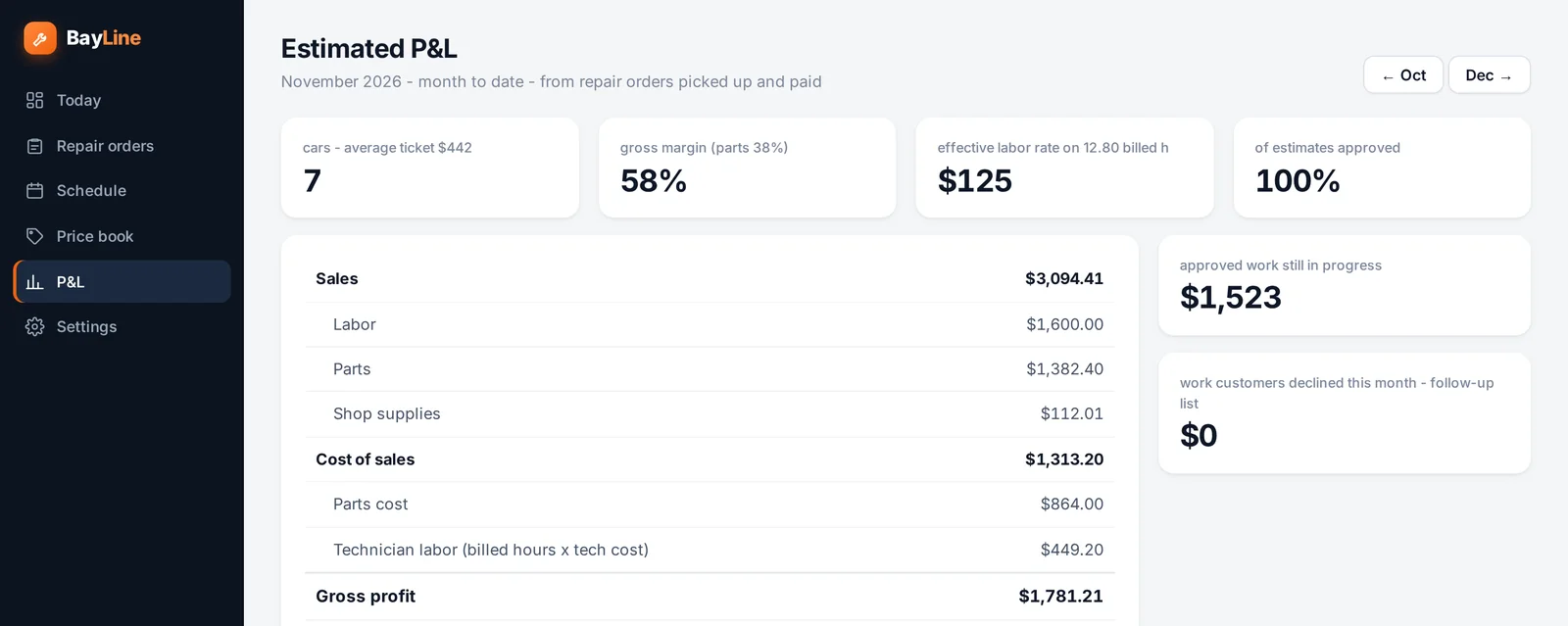
Parts margin and tech cost on each job, plus a month view: sales, gross profit, average ticket, effective labor rate.

A schedule that fits your shop

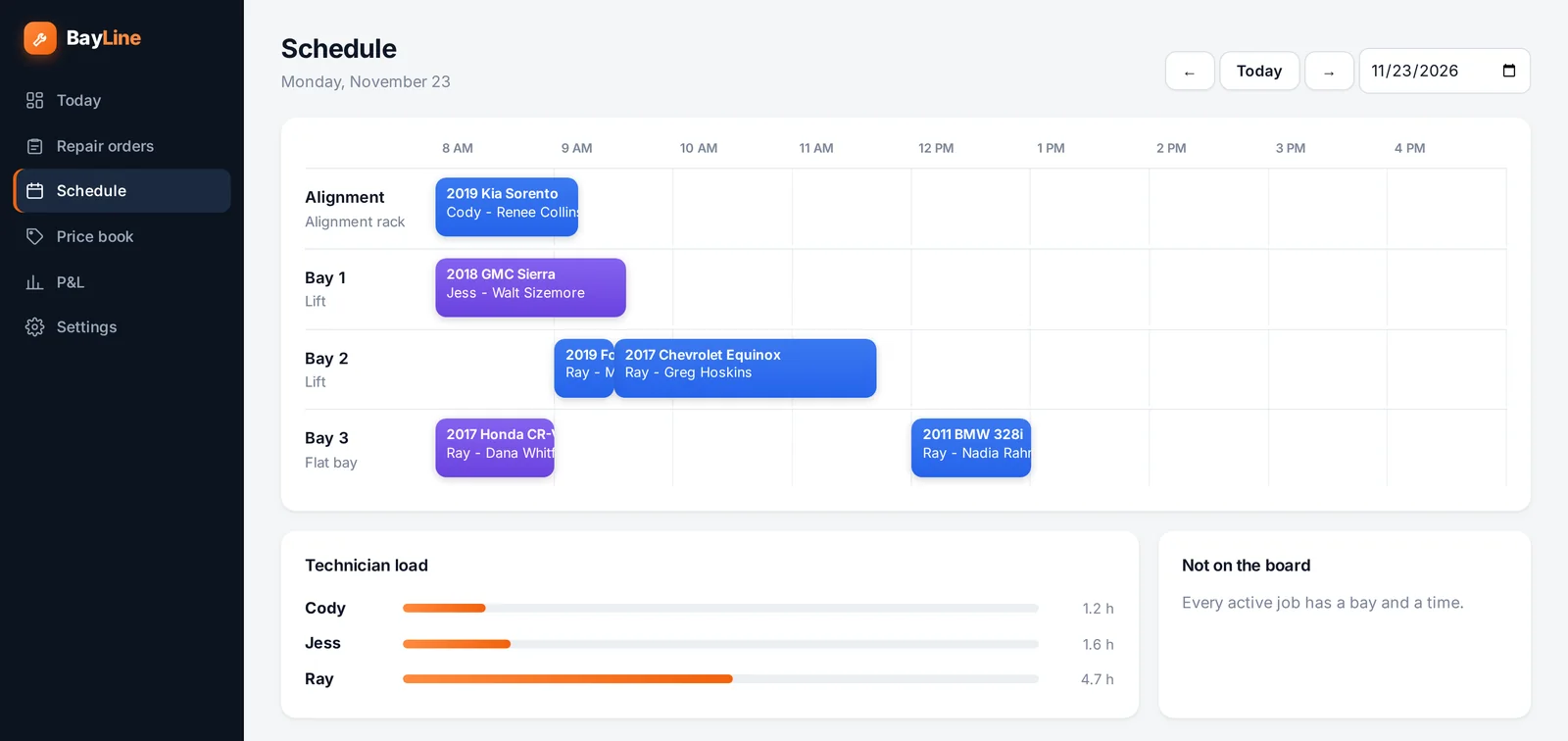
Bays across the top of the day, who's on what, and how loaded each tech is. No two cars in one bay.

Diagnostics that update the quote

Codes and notes in, revised estimate out, customer approval on record.

Texts and emails that send themselves

Estimate ready, booked, checked in, waiting on parts, ready for pickup. Plus a reminder the day before.

Walk-ins and phone calls too

Type in what the customer said at the counter and get the same drafted estimate.

The day's schedule laid out by bay with technician load
Monday at a four-bay shop: every job has a bay, a tech and a finish time.
Month to date sales, cost of sales and gross profit
Month to date, straight from the repair orders you closed.
It works for you

You're still
the boss.

BayLine does the typing, the scheduling and the phone tag. It doesn't make the calls that are yours to make.

Your prices, not a guessJobs are priced from your price book. Anything outside it is flagged so you can check the numbers.
You decide what needs your eyesRoutine jobs you mark in the price book, like an oil change or a rotation, are quoted on the spot. Everything else waits for your approval before the customer sees a price.
No work without a yesThe customer authorizes the total in writing. If the job grows, they approve again before you go further.
Override anythingMove the appointment, change the tech, rewrite a line, set the status by hand. It's your shop.
See it run

The whole thing in a minute.

Straight answers

Questions shops ask.

Is this going to quote the wrong price to my customer?

It can't send a price on its own unless you turn that on. It drafts the estimate from your price book, and you approve it before the customer sees a dollar amount. When the cause isn't certain, it quotes the diagnostic and shows the likely repair as "possible, depending on what we find."

Do my customers need an app?

No. They get a link by text or email. It opens in the browser on their phone, where they can read the estimate, approve it, pick a time and ask questions.

I'm not a computer person. How hard is it?

If you can send a text and read a work order, you can run it. The main screen is one board: what needs you, what's waiting on a customer, what's in the shop, what's ready.

What about people who call or walk in?

Type what they told you into a new repair order and BayLine drafts the estimate the same way. You can also record a yes you got over the phone or at the counter.

Does it replace my service writer?

No. It takes the typing, the phone tag and the "is it done yet" calls off their plate so they can spend time with the customers standing in front of them. In a one or two person shop, it covers the counter while you're in the bay.

Where do the labor times come from?

From your price book, which you set up and can change any time. BayLine does not ship with a labor guide today, so the hours are the hours you charge.

See it with your shop's numbers.

Tell us about your shop and we'll set up a walkthrough with your labor rate, your bays and a few of the jobs you do every week.